Appearance
Lazy Loading and Code Splitting
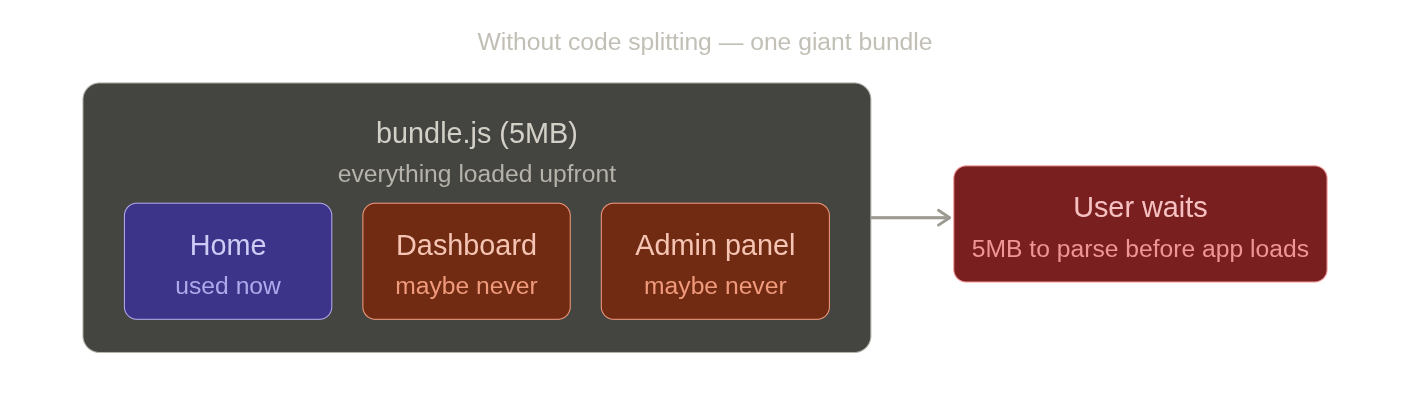
- Code splitting breaks that single bundle into smaller chunks — each route or component gets its own file, loaded only when needed.
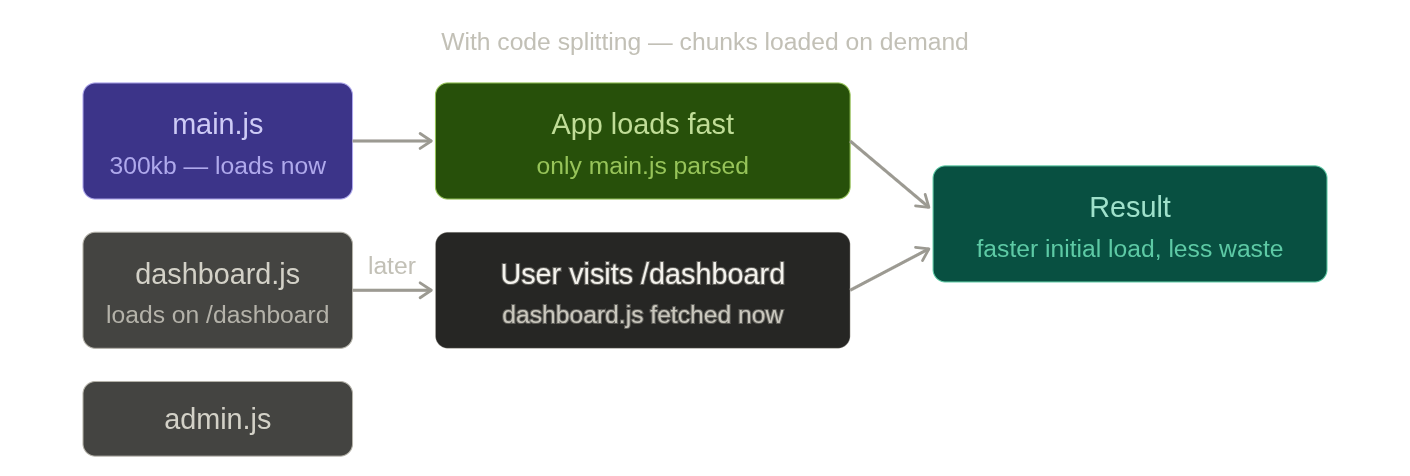
- Lazy loading is how you actually implement code splitting in React — React.lazy tells React to defer loading a component until it is actually rendered, and Suspense handles the loading state while the chunk is being fetched.
Without Code Splitting
js
// Webpack bundles everything into one file
import Dashboard from "./Dashboard";
import AdminPanel from "./AdminPanel";
import Settings from "./Settings";

// bundle.js = 5MB — user downloads ALL of this on first visit
// even if they never visit /dashboard or /admin
React.lazy + Suspense
jsx
import { lazy, Suspense } from "react";

// Instead of static import — React creates a separate chunk per component
const Dashboard = lazy(() => import("./Dashboard"));
const AdminPanel = lazy(() => import("./AdminPanel"));
const Settings   = lazy(() => import("./Settings"));

function App() {
    return (
        <Suspense fallback={<div>Loading...</div>}>
            <Dashboard />
        </Suspense>
    );
}
Static import → included in main bundle immediately
lazy import → separate chunk, fetched only when component is first renderedWith React Router
The most common pattern — each route is its own chunk:
jsx
import { lazy, Suspense } from "react";
import { Routes, Route } from "react-router-dom";

const Home      = lazy(() => import("./pages/Home"));
const Dashboard = lazy(() => import("./pages/Dashboard"));
const Admin     = lazy(() => import("./pages/Admin"));

function App() {
    return (
        <Suspense fallback={<PageSpinner />}>
            <Routes>
                <Route path="/"          element={<Home />} />
                <Route path="/dashboard" element={<Dashboard />} />
                <Route path="/admin"     element={<Admin />} />
            </Routes>
        </Suspense>
    );
}
User visits / → Home.js fetched (other chunks not loaded)
User visits /dashboard → Dashboard.js fetched (only now)
User visits /admin → Admin.js fetched (only now)With an Error Boundary
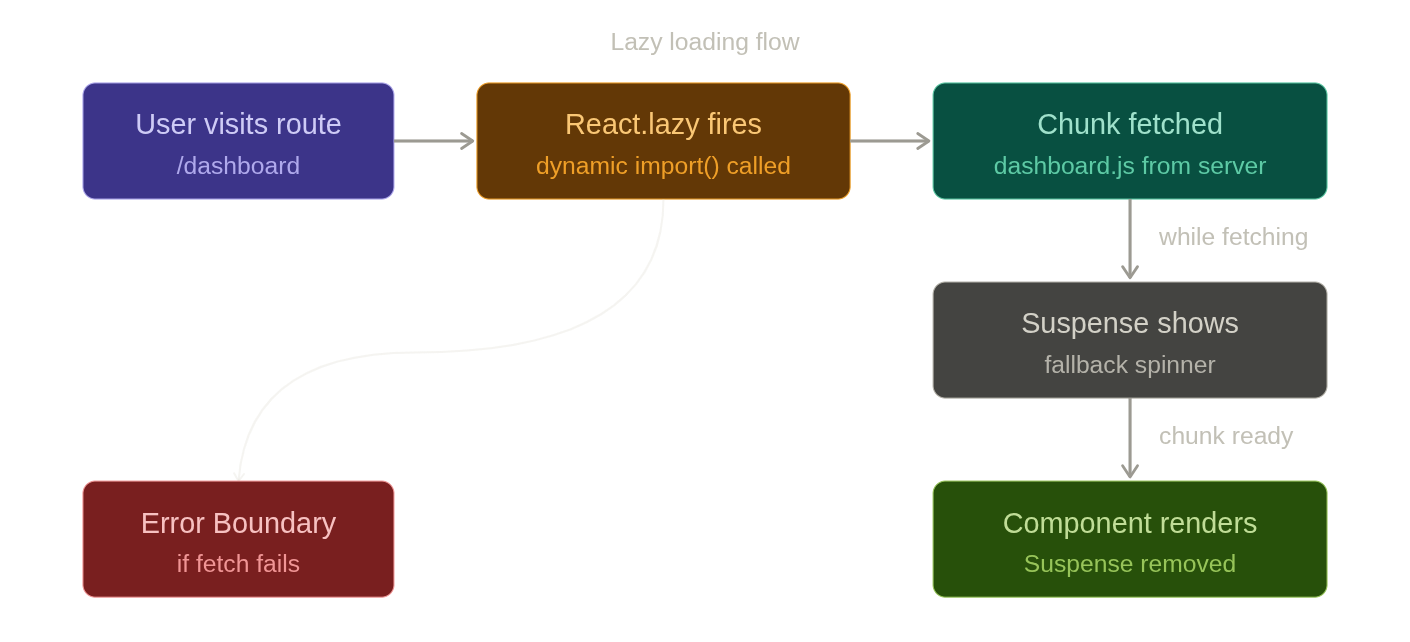
React.lazy fetches a chunk over the network — it can fail. Always wrap with an Error Boundary:
jsx
import { ErrorBoundary } from "react-error-boundary";

function App() {
    return (
        <ErrorBoundary fallback={<div>Failed to load page</div>}>
            <Suspense fallback={<PageSpinner />}>
                <Routes>
                    <Route path="/dashboard" element={<Dashboard />} />
                </Routes>
            </Suspense>
        </ErrorBoundary>
    );
}
Fetching chunk → Suspense fallback shows
Chunk ready → component renders
Fetch fails → Error Boundary fallback showsNamed Exports
React.lazy only works with default exports. For named exports, re-export as default:
jsx
// Wrong — React.lazy does not support named exports directly
const { Dashboard } = lazy(() => import("./Dashboard"));

// Correct — wrap named export in a default export
const Dashboard = lazy(() =>
    import("./Dashboard").then(module => ({
        default: module.Dashboard  // re-map named export to default
    }))
);
Preloading
By default chunks load when the component first renders. You can preload earlier — on hover or on route change — to eliminate the loading flash:
jsx
const Dashboard = lazy(() => import("./Dashboard"));

// Preload on hover — chunk starts fetching before user clicks
function NavLink() {
    return (

            href="/dashboard"
            onMouseEnter={() => import("./Dashboard")} // triggers fetch early
        >
            Dashboard
        </a>
    );
}
What Not to Lazy Load
jsx
// Pointless — tiny component, splitting cost outweighs benefit
const Button = lazy(() => import("./Button"));

// Pointless — used on every page, will always be loaded anyway
const Navbar = lazy(() => import("./Navbar"));
Lazy load when:
- The component is large (heavy library, chart, editor)
- The component is not needed on the initial render (modal, drawer, admin routes)
- The component is only needed by some users (admin panel, premium features)