Appearance
Next.js Rendering
1. Core Difference: Next.js vs. Traditional SPAs
Traditional SPA (Vite / Create React App):
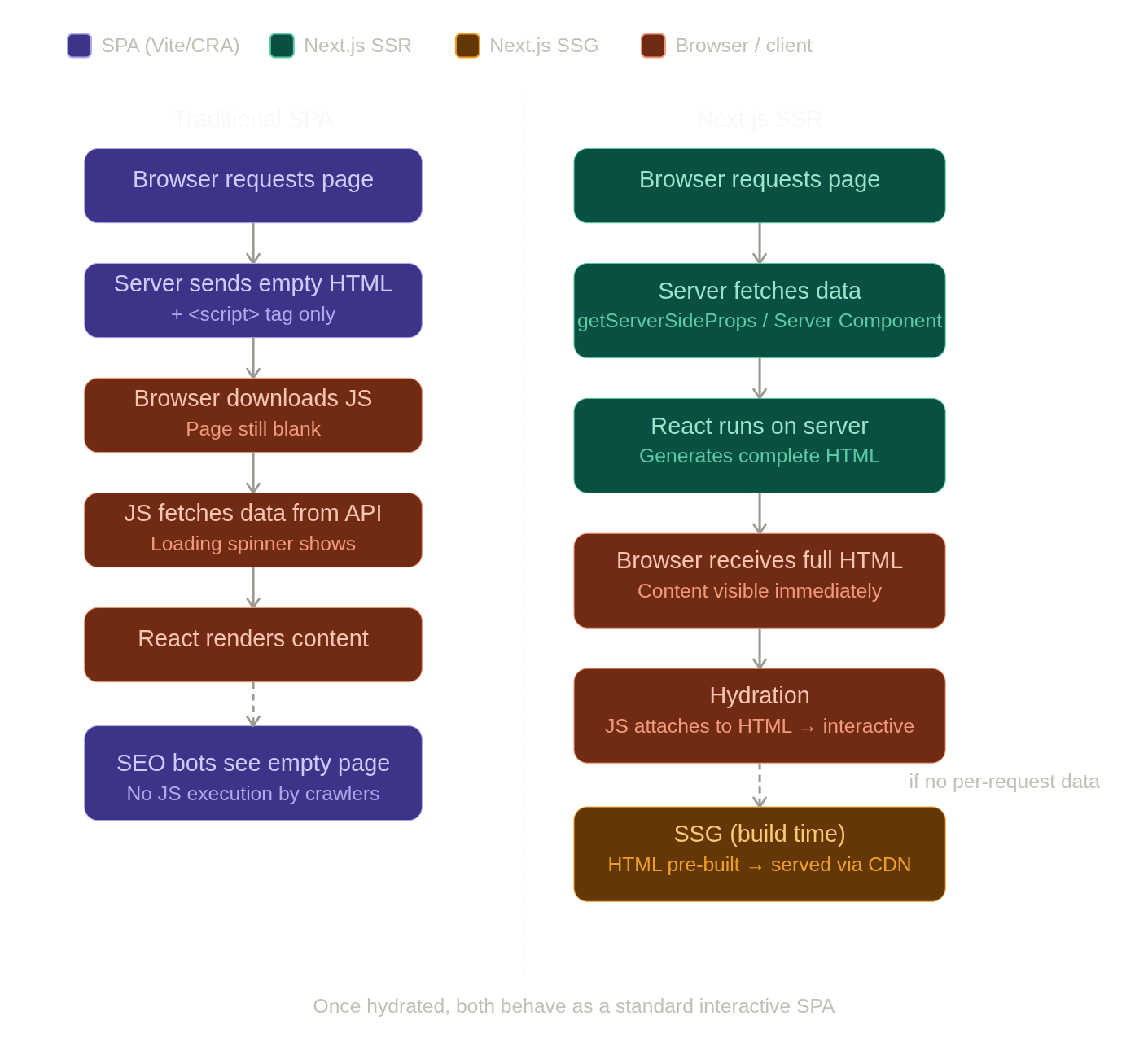
The server sends an essentially empty HTML file containing only a <script> tag. The browser must download and run JavaScript, which then fetches data from an API, and only then renders any visible content. This means the initial HTML is meaningless — bots and users see a blank page until all that work completes.
Next.js:
React can run on the server before anything is sent to the user. The initial HTML already contains the real, rendered content.
2. The Data Flow in Next.js
Pages Router (Classic)
- Request arrives → server runs
getServerSidePropsto fetch data from a database or API. - HTML generation → React executes on the server using that data and produces complete HTML.
- HTML sent to browser → the user sees real content immediately.
- Hydration → the browser downloads JavaScript and React "attaches" to the existing HTML, wiring up event listeners and making the page interactive. This process connects static HTML to React's virtual DOM.
- The
__NEXT_DATA__trick → Next.js injects the server-fetched data into a<script id="__NEXT_DATA__">tag so client-side React knows exactly what data was used during the server render, preventing a mismatch.
App Router (Next.js 13+)
- Server Components fetch data directly using
async/awaitinside the component itself — nogetServerSidePropsneeded. - React's streaming and Suspense replace the
__NEXT_DATA__injection pattern. - Client Components (marked
"use client") handle interactivity and still hydrate in the browser.
Hydration Mismatch (Important Gotcha)
If the HTML the server renders doesn't match what React would render on the client, you get a hydration error. Common causes: using Date.now(), random values, or window during render. Always ensure server and client produce identical output.
3. Static Generation (SSG)
- If a page has no per-request data needs, Next.js builds a static HTML file at build time.
- These files are served instantly via a CDN — no server code runs on each visit, making them extremely fast and cheap.
- In the Pages Router, opt in with
getStaticProps. For dynamic routes (e.g./blog/[slug]), also usegetStaticPathsto tell Next.js which slugs to pre-build. - In the App Router, any Server Component that doesn't use dynamic data is automatically statically rendered.
When to use SSG vs SSR:
| Use SSG when… | Use SSR when… |
|---|---|
| Content rarely changes (docs, blog posts) | Data changes per-request (dashboards, user feeds) |
| Speed and CDN caching are top priorities | Personalisation or auth is required |
4. Why Server Rendering Matters
SEO and social crawlers — search engines and link-preview bots (Twitter/X, Facebook, Slack) often do not execute JavaScript. They need the HTML to already contain correct metadata and content.
User experience — every visitor effectively has "JavaScript disabled" for the first few milliseconds or seconds while the script bundle loads and parses. SSR ensures users see real content during that gap instead of a blank screen or loading spinner.
Performance — SSR eliminates the waterfall: HTML → JS download → API call → render. On the server those steps are collapsed into one, so the browser receives finished HTML in a single round trip.
5. Server-Side Limitations
No browser globals — window, document, localStorage, and sessionStorage do not exist in a Node.js environment. Any code that references them will crash during server rendering. Guard with:
js
if (typeof window !== 'undefined') {
  // safe to use browser APIs here
}
Or use useEffect, which only runs on the client.
Lifecycle hooks don't run on the server — useEffect, onClick, and other event handlers are client-only. They activate only after hydration completes. Code that depends on them will not execute during server rendering.
6. Summary
Next.js is not an alternative to React — it is a framework that runs React on the server to guarantee the first paint contains real, correct content. After that initial load, the hydrated page behaves exactly like a standard, highly interactive Single Page Application.
Request → Server renders HTML (with data) → Browser displays content
         → JS downloads → Hydration → Interactive SPA